Popular Pages - New Filter
Hi Folks!
New Filter
We’ve added a NEW filter to the Popular Pages stat.
What does this New Filter do?
This new filter helps you to identify your converting keywords.
Your “converting keywords” are the keywords that result in visitors to your site:
- making a purchase
- signing up for a service
- downloading a brochure
- or completing any other desired action on your site
How does this help me?
Information about your converting keywords is incredibly valuable.
If you can identify the exact search terms that actually result in sales (or sign-ups, or downloads, etc) on your site, then you can focus your advertising and SEO efforts on these terms. This should allow you to maximize your revenues and minimise your spend on marketing.
Can I see an example?
Sure! Let’s use this fictional site “Bites Bakery” to explain how this works…

Bites Bakery has a website which allows its customers to order cakes and other baked goods online. For Bites Bakery, a conversion (or success) is the placement of an order online.
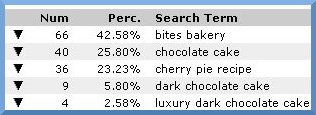
With StatCounter your “Keyword Analysis” gives you a list of the ACTUAL search terms used to find your site. For Bites Bakery, you can see that people searched for :
-
bites bakery
chocolate cake
cherry pie recipe etc
From the above, we know the search terms that are bringing visitors to Bites Bakery… but which of these search terms result in actual orders being placed? To find this out, we need to look at the Popular Pages stat…

If we look at the Popular Pages for Bites Bakery, we can see that:
- 257 people visited the homepage
- 31 people added a product to their baskets
- 6 people tried to checkout
-
But only 4 people successfully completed the order process and visited the order-confirmation.php page - it’s these “converting keywords” that we are really interested in.
(Don’t forget! It’s the “converting keywords” that result in a sale/sign-up/download on your site!)
We want to find out which keywords result in people confirming an order. To do this, we drilldown on the page www.bitesbakery.com/order-confirmation.php and apply the Keyword Analysis filter.

First step is to click the “drilldown” arrow beside the webpage you are interested in. For Bites Bakery, we are interested in people who made an order online - that is, the people who reached the Order Confirmation page.

Next step is to apply the “Keyword Analysis” filter - click the link.

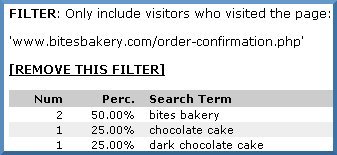
Now, we see a list of the keywords used by the visitors who reached the Order Confirmation page. With this information we can see that:
Although 40 people found the Bites Bakery Site by searching for “chocolate cake” (see Keyword Analysis), only 1 of these people “converted” and placed an order online (see Popular Pages filtered by Keyword Analysis). That means for the search term “chocolate cake” we had 1 order from 40 searches => 2.5% conversion rate
On the other hand, while only 9 people found the site by searching for “dark chocolate cake” (see Keyword Analysis), 1 of these people “converted (see Popular Pages filtered by Keyword Analysis). That’s 1 order from 9 searches => 11% conversion rate
From the above it’s clear that we are getting a far better return on the search term “dark chocolate cake” than for “chocolate cake” - this information is useful in deciding where to direct our SEO efforts and marketing spend.
Summary
Use the “Keyword Analysis” filter on “Popular Pages” to identify the search terms that send visitors to a particular page on your site.
Note re New StatCounter SC4 System
As a result of the delays we have experienced converting all members to the new StatCounter platform, we have made this new filter available on BOTH the old StatCounter SC3 system as well as on the new SC4 system. Our tech team continue to work on the conversion project - we are terribly anxious to get the conversion done as this will allow us to release many new features and improvements. Thanks so much for your patience and enjoy the new filter!

May 1st, 2009 at 12:48 am
I recall Armestrong’s quote: That’s one small step for man; one giant leap for mankind! Awesome indeed for every webmaster/blog owner to keep an eye on the ‘real keywords’ for a better SEO
As for the conversion SC3 —> SC4, it’ll take sometime as I understood from an earlier post so thanks a lot for keeping this available for SC3 users
May 1st, 2009 at 2:32 am
OMG this is an excellent service. Now i have come to know my best converting keywords.
i was cheking more and i have a request with you, could you please do the same for “exit pages” and “exit links” because this the conversion for an affiliate.
Many many thanks and wishing you great success ahead.
May 1st, 2009 at 7:42 am
Nice to see new features
One trick I use with SC is to create a second project and put the code on my order page. I use a redirect (as an affiliate) to direct people to a merchant, and the redirect script contains the new project code. This makes it very easy to track referrals and can be put on multiple sites or referal pages very easily. Then, of course, you can get all the usual stats for the new project as normal.
A feature that would be very handy to expand this would be to change the “Project” page (where you see all the summary stats of every project) to show the number of “unique” visitors rather than page loads as it does now. This would save having to drill into every project to find out and make referal tracking easier.
May 1st, 2009 at 2:54 pm
Useful feature. Keep up the good work!
May 1st, 2009 at 6:29 pm
This feature is a super option……thanks StatCounter Team……………..
May 1st, 2009 at 10:32 pm
Keep up the good work.
Thanks
May 2nd, 2009 at 4:17 am
Wow, I love this new feature! Very handy and useful.
I can’t wait to get Exit Links statistics in SC4 as well, my new SC projects have it of course, but regretfully old ones still don’t.
May 2nd, 2009 at 10:59 am
This is a great tool.
Before I had to scroll down all the logs, to see each word point to each page on my site.
Now I have all together.
That is a very good help
Thanks Baptista
May 3rd, 2009 at 9:45 am
I don’t comment often on the posts, but just wanted to congratulate you for this one. Subscribed to your feed!
May 4th, 2009 at 10:56 am
it would be useful if the respective search engine is also tagged to the converting keyword. for example may be i should spend a bit less on “dark chocolate cake” on yahoo that Google due to the latter’s higher conversion
May 4th, 2009 at 11:52 am
best work….good
May 4th, 2009 at 1:04 pm
Great. I’m finding this one of the most useful features at StatCounter.
Thanks.
May 4th, 2009 at 1:09 pm
Great feature. Thanks.
May 4th, 2009 at 1:51 pm
thanks..very very good blog..
May 6th, 2009 at 3:36 am
Thats very nice to see new features of Statcounter. I have always been a fan of statcounter.
Cheerzzzzzzzzzzz
May 6th, 2009 at 4:22 am
I love here. very good blog to learn
May 6th, 2009 at 10:25 am
thanks for the great products.
May 6th, 2009 at 10:27 am
Keep up the great stuff coming. Love you guys.
May 6th, 2009 at 1:58 pm
Cool stuff. Thanks for your effort to give us cool tools.
I’m using statcounter and recommending to my friends.
May 6th, 2009 at 5:40 pm
Wow, new things. I like when I get new things for free. Thank you and keep it up guys.
May 6th, 2009 at 6:59 pm
You guys are making this an exact Science. Brilliant, power to you !
May 6th, 2009 at 11:22 pm
This is an excellent addition, such a useful feature.
May 6th, 2009 at 11:38 pm
That would be pretty damn handy, especially if you spend alot on PPC advertising, for all you know it could just be certain keywords that convert and your continuing to throw money down the drain with the other NON-converting keywrds.
Cool.
May 7th, 2009 at 2:31 pm
SC is good from the beginning.. its getting better and better.. congratulations on this new and useful improvements and thank you.
May 7th, 2009 at 7:04 pm
What an excellent tool, This will help ALOT.
I’m going to read up on it just now and sign up, look forward to this update.
May 7th, 2009 at 7:05 pm
What an amazing tool, I’m glad i found it, this should help keep track of what PPC adverts are working.
Thanks.
May 8th, 2009 at 8:45 am
Keep up the good work.
Thanks
May 8th, 2009 at 8:53 am
We are very happy with the tools statcounter has to offer, they just keep getting better!!
We have used statcounter for over 5 years with great results.
Thank SC
May 8th, 2009 at 12:28 pm
Wow, I love this new feature! Very handy and useful.
May 9th, 2009 at 3:58 am
I have been looking at my stats, this is a great tools. It sure pin point which key phrases are converting.
Many thanks
May 9th, 2009 at 6:56 am
Could help to optimize the quality. Good job!
May 9th, 2009 at 8:13 am
Very handy and useful. Help me on keep track of what PPC adverts are working.
May 10th, 2009 at 8:27 am
OMG this is a great service. very good feature.
Thanks alot
May 10th, 2009 at 10:51 am
[...] som säkert många som läser här använder för att mäta besöksstatistik har uppdaterat med ett nytt filter som hjälper till att hitta sökord som konverterar. Du kan till exempel kolla upp vilket sökord [...]
May 10th, 2009 at 11:46 am
Hmmm. I’ve been pondering how to approach my choice of keywords. This could turn out to be quite a useful tool indeed.
May 10th, 2009 at 8:24 pm
We love the new features………great job StatCounter ……..I can’t wait to start using it.
May 11th, 2009 at 10:48 am
Wow, I love this new feature! Very handy and useful.
May 12th, 2009 at 9:09 pm
Would this have anything to do with why the stats are hanging up the loading of my page suddenly??????
May 12th, 2009 at 9:19 pm
I use the stats counter all the time to track information. Great product.
May 12th, 2009 at 9:22 pm
Great feature addition! 10/10!
May 13th, 2009 at 7:10 pm
hi.that was perfect.i really love this feature.really thanks alot.i love you gays
May 14th, 2009 at 5:32 pm
Hmm This is really wonderful. Better SEO… Way to go.. Thanks a lot
May 14th, 2009 at 7:50 pm
I use the stats counter all the time to track information. Great product. thanks
May 15th, 2009 at 10:27 pm
Really great read. Keep up the good work and good luck with your site!
May 16th, 2009 at 10:45 am
This feature sounds really interesting. I always wanted to see which of my keywords convert and now i am pretty sure to focus on this filter and get 100% emphasic of SEO on right keywords!
May 16th, 2009 at 1:42 pm
This feature is really powerful indeed. I see that it can eliminate guesswork. Now I can find out what keywords to use to make my campaigns more effective and what keywords to not spend my time on.
Thanks.
May 18th, 2009 at 6:57 am
Great service,keep up the good work,congrats!
May 18th, 2009 at 11:08 am
thats a great addition.
But its a pity this hasnt been added to the “Downloads” section so that i can see what keywords are bringing people to download stuff.
May 19th, 2009 at 3:58 pm
Will help alot towards monetizing your site.
thanks
May 19th, 2009 at 11:26 pm
Thanks for explaining the new feature!
Camdy
May 19th, 2009 at 11:48 pm
Wonderful feature…superb! Can wait for more features to come out!
May 20th, 2009 at 9:05 am
This is a great feature really.
I have a question here, how to make sure if i have SC4 or SC3 ?!
Thanx
May 20th, 2009 at 12:28 pm
Wonderful features and good functionality I liked it very much.
May 20th, 2009 at 7:01 pm
Love the look of your site - are you having fun with it? Keep up the good work and good luck with your site!
May 20th, 2009 at 7:12 pm
Great features and awesome functionality!
May 21st, 2009 at 2:59 am
Statcounter, you never cease to amaze. That is a super handy addition to the search term stats. I was hoping you would add that…and you did
May 21st, 2009 at 10:37 am
Love Statcounter. Gives me the really important facts I need to know instantly. Wouldn’t even consider an alternative product. Keep up the excellent work.
May 21st, 2009 at 11:03 am
Thanks, Statcounter is Great. All the features have allowed us to watch which marketing funds are working and which ones that are not. This great information allows ABV Glass to save money, and in return can give our customers better prices. Thanks again
May 21st, 2009 at 2:24 pm
A friend just told be about this service. This is really going to help me. And for free?!?! Thanks.
May 21st, 2009 at 2:50 pm
Very useful to understand how clients buy in our site.
thanks
Marc
May 23rd, 2009 at 6:00 am
I can’t wait to get Exit Links statistics in SC4 as well, my new SC projects have it of course, but regretfully old ones still don’t.
May 24th, 2009 at 1:52 pm
Quite a useful feature you’ve added. Cheers again to the statcounter team.
May 25th, 2009 at 5:47 am
Statcounter is simply the best.
I might be able to help with the French translation. Keep on with the good work.
Best greetings and many thanks.
Viviane.. Thanks.. ßlog.Satatcounter
May 26th, 2009 at 6:56 am
Una herramienta muy util. Gracias por seguir creciendo y ayudando a quienes hacemos de la web nuestro trabajo.
bluedreams.com.ar
May 26th, 2009 at 8:33 am
This will definetly help me to increase my conversion rate.
Thanks for providing this filter.
May 26th, 2009 at 10:26 am
Wow, I love this new feature! Very handy and useful. I might be able to help with the French translation. Keep on with the good work.
May 26th, 2009 at 1:22 pm
I am new in statcounter and happy to find the blog, otherwise it is difficult to know all the functions.
May 26th, 2009 at 2:31 pm
Nice work. It helps to know where on your website your orders actually come from.
May 27th, 2009 at 3:03 pm
This is an awesome addition.
The “came from” filter is also of great help when tracking conversions on our website - especially when trying to find out which of the sites that we advertise on, actually result in a sale/conversion.
A helpful update might be adding the date next to the data so that we can see how recent this information is - or possibly even a drill-down option to see what pages inside the site led to the conversion. Knowing the “funnel-path” of customers is extremely helpful in finding out which of your pages actually lead to a purchase.
Either way, this is an extremely helpful additon - Thanks!
May 28th, 2009 at 12:49 pm
this is awesome addition
May 28th, 2009 at 2:15 pm
Hii
I have been looking at my stats,total site information this is a great tools. It sure pin point which key phrases are converting.
i using statcounter for my blog…this is very nice website…..
I like it….
Many thanks
Googleexpert
May 29th, 2009 at 4:37 am
Great feature indeed…
SanjeevSaikiaArt
May 29th, 2009 at 6:46 am
hey thanks for that awesome feature….
great work statcounter,s team
Thanks again
May 29th, 2009 at 5:14 pm
Thanks, Statcounter is Great.
May 29th, 2009 at 11:14 pm
I can’t wait to get Exit Links statistics in SC4 as well, my new SC projects have it of course, but regretfully old ones still don’t.
May 30th, 2009 at 11:12 pm
Thanks, Statcounter is Great.I like it.
June 2nd, 2009 at 11:41 pm
Not only do you have a great statistic counter tool - you also have fantastic information in your blog.
What can I say? Awesome !
Regards
Gerry
June 3rd, 2009 at 4:43 pm
HELLO
I have been looking at my stats,total site information this is a great tools.
this is great toolll.
THX
June 4th, 2009 at 1:43 pm
This is an amazing tool that you have. I believe statcounter is not to be missed by anyone serious about tracking and web analysis. The keyword analyser is also great.
June 7th, 2009 at 3:51 pm
I think you add another great tool again.
June 12th, 2009 at 4:32 am
it really powerful tools and also easy to use, thanks a lot. xx
June 12th, 2009 at 10:51 pm
Good feature. I just wish Wordpress.com allowed the java version of statcounter on the blog. The HTML only version gives minimal feedback and nothing for keywords
Have to rely on wordpress.com’s own stats page for that which is pretty limited if you ask me.
June 13th, 2009 at 6:20 am
Awesome features. Great opputunity for young generation. indeed its a remarkable work by stat counter team. thanks again to stat counter team.
June 16th, 2009 at 12:42 am
This makes it very easy to track referrals and can be put on multiple sites or referal pages very easily.
June 18th, 2009 at 6:09 am
Very good feature, Thanks for this great feature!
June 21st, 2009 at 12:39 am
Very good feature indeed
June 28th, 2009 at 10:30 pm
Will try to use this new feature.